Flower Genie ® - Software for Amateur Gardenersby Ideas for Gardens.comLast updated: 7th March 2017
Flower Genie Home Product Description Screenshots BUY Flower Genie User Comments About us Same day despatch
BUY Flower Genie
Index
1.Run program FG037
2. Plants mode
3. Exploring Plants
4. Full screen photo
5. Photo details
6. Disk Photos list
7. Web Photos list
8. Adding photos
9. Photos Index
10. Add Web Photos
11. Google results
12. Saving the URL
13. Select for Editing
14. Plant Profile
15. Large data
16. Hover for data
17. BUY Seed
18. Who sells this
19 Gardens mode
20. Garden Areas
21. Personalise
22. Make Gardens
23. Add to Garden
24. Slide show
25. Tips
26. Preferences
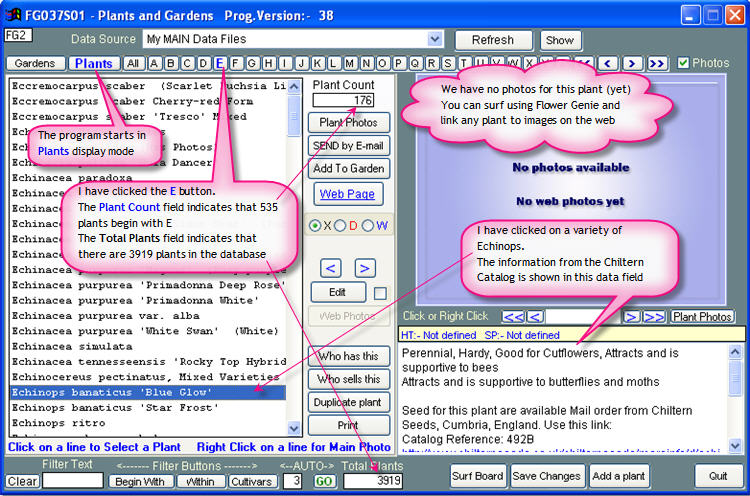
2. Plants Mode The initial screen when you start the program My Plants and GardensThis screen has two modes of display - a) Gardens and b) PlantsThe program starts in Plants mode. In this mode the Plants button is highlighted in Blue
Previous - Next
Flower Genie Home Product Description User Comments BUY Flower GenieAbout us Compare Flower Genie to our other Gardening Software Products